
What is a Workspace?
A Workspace in RealityTwin is a dedicated interface tailored to a specific aspect of the digital twin workflow. Each workspace offers a focused set of tools and capabilities designed to help users perform specialized tasks efficiently, whether they are managing assets, editing layers, or composing scenes.
RealityTwin currently offers multiple types of workspaces, with more to come as the platform evolves. Each workspace isolates a particular type of activity, keeping your experience streamlined and relevant.
Types of Workspaces
Section titled “Types of Workspaces”Twin Workspace
Section titled “Twin Workspace”The Twin Workspace is designed for users who want to:
-
View and navigate a fully composed digital twin
-
Interact with mapped assets and spatial data
-
Monitor and document asset conditions
-
Share insights with collaborators
-
Batch changes using Draft Mode before publishing them to the live Twin
It’s the go-to workspace for everyday operations, asset exploration, and annotation.
Composer Workspace
Section titled “Composer Workspace”The Composer Workspace focuses on editing and alignment workflows, such as:
-
Importing and aligning multiple reality capture layers (e.g., scans, meshes)
-
Managing spatial relationships and coordinate systems
-
Adjusting visibility and layer order for scene composition
This workspace is essential during the initial setup of your Twin.
Switching Between Workspaces
Section titled “Switching Between Workspaces”To move from one workspace to another:
-
Open RealityTwin.
-
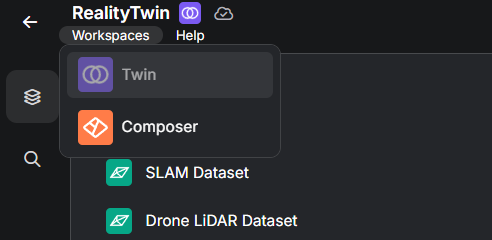
Use the workspace switcher in the top-left corner of the interface.
-
Select either Twin Workspace or RealityComposer Workspace, depending on your task.
-
Your session will reload in the chosen context, preserving project data.
Why Workspaces Matter
Section titled “Why Workspaces Matter”Segmenting workflows into workspaces ensures that:
-
Users see only the tools and data relevant to their current task
-
Performance is optimized for the type of interaction